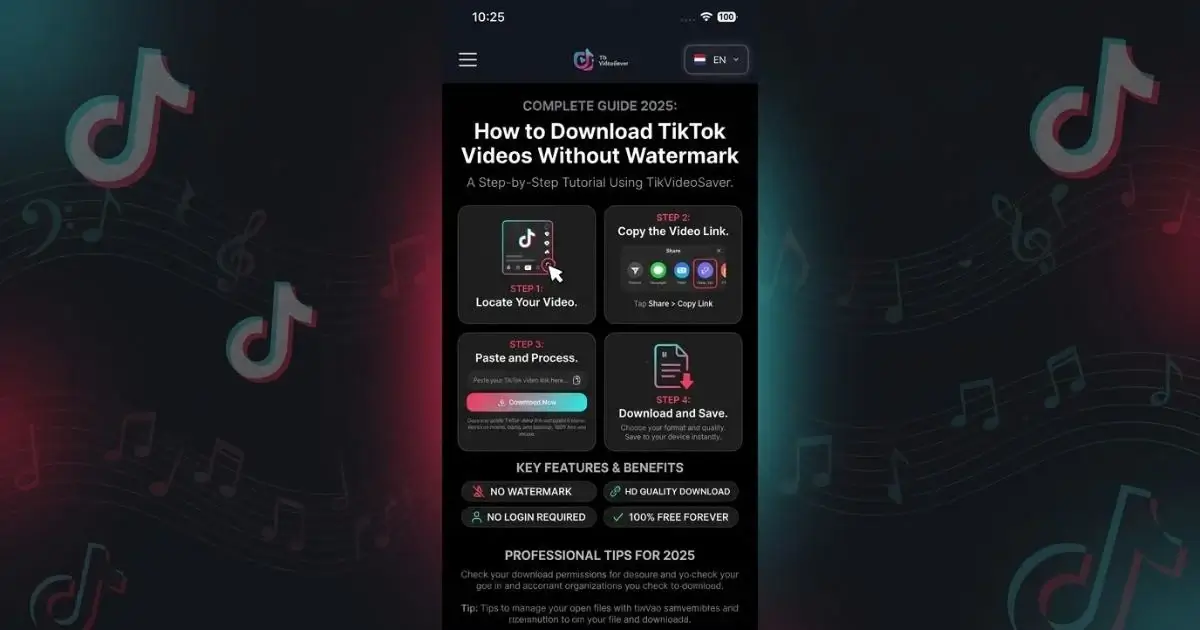
How to Download TikTok Videos Without Watermark (Complete Guide 2025)
If you have ever tried to save a TikTok video to your phone, you already know the frustration. You download it, open your gallery, and right there in the middle of your video is that TikTok logo and username stamped across the screen. It looks messy, it ruins the video, and if you wanted to use it for anything — editing, sharing, keeping it for personal memories — that watermark just gets in the way.
The annoying part is that TikTok does this on purpose. Every video you save directly through the app comes with that watermark baked in. There is no setting to turn it off, no option to save a clean copy, and no official way around it inside the app itself.
But here is the thing. There is a proper way to download TikTok videos without any watermark at all — and it is a lot simpler than most people think. In this guide I am going to walk you through the whole process step by step. No complicated tools, no shady software, no login required. Just a clean and simple method that actually works.
Why Does TikTok Add a Watermark in the First Place
Before we get into the solution let us quickly understand why TikTok adds that watermark. TikTok does it for two main reasons. First, it is a branding strategy. Every time someone shares a TikTok video on another platform, that watermark acts like free advertising for TikTok. It tells the viewer where the video came from and pulls them back to the app.
Second, it is a way to give credit to the original creator. The username that appears in the watermark identifies who made the video. In theory it protects creators from having their content stolen and reposted without any attribution.
Both of these reasons make sense from TikTok's perspective. But for users who want a clean copy of a video for personal use, editing, or offline storage, the watermark becomes a genuine problem. And that is exactly the gap that TikVideoSaver was built to fill.
What You Actually Need to Get Started
The good news is that you do not need much. Here is everything required before you follow the steps below:
✔ Any device — iPhone, Android, tablet, laptop or desktop
✔ A browser — Safari, Chrome, Firefox, any modern browser works
✔ The TikTok app or TikTok website to copy your video link
✔ A stable internet connection
✔ That is genuinely everything
No app installation. No account creation. No payment. Nothing extra required on your end.
Step by Step — How to Download TikTok Videos Without Watermark
Step 1 — Open TikTok and Find the Video You Want
Open TikTok on your phone or visit the TikTok website on your desktop browser. Scroll through your feed or search for a specific account or hashtag to find the video you want to download. Once you have found it, stop there and do not do anything yet.
One thing to keep in mind before you continue — the account needs to be public. TikVideoSaver only works with publicly available content. If the account is private, the video is protected and no tool can access it. That is the right way to handle things and we fully respect it. So make sure the account you are downloading from is set to public before moving on.
Step 2 — Copy the Link of the TikTok Video
This step is slightly different depending on whether you are on mobile or desktop.
On mobile — tap the Share icon on the right side of the video. It looks like an arrow pointing to the right. A menu will slide up from the bottom of your screen showing you different sharing options. Look for the option that says Copy Link and tap on it. The video link is now copied to your clipboard and ready to use.
On desktop — simply go to the TikTok video in your browser and copy the full URL directly from the address bar at the top of the page. That is all you need to do.
Both methods work perfectly with TikVideoSaver.
Step 3 — Open TikVideoSaver in Your Browser
Now open a new tab in your browser and go to TikVideoSaver. The website loads quickly and you will immediately see the download tool right there on the homepage. There is no signup page waiting for you, no popup asking for your email, no account wall blocking you from using it. Just the tool, clean and ready to go.
This is one of the things I personally felt was missing from most other download tools. You should not have to jump through five hoops just to paste a link. TikVideoSaver keeps it straightforward from the moment you land on the page.
Step 4 — Paste the TikTok Link Into the Input Box
You will see a clear input box at the top of the TikVideoSaver homepage. Tap or click on that box and paste the link you copied from TikTok. On mobile you can tap and hold inside the box and select Paste from the menu that appears. On desktop just use Ctrl+V on Windows or Command+V on Mac.
Once the link is pasted and sitting in the input box, tap or click the Download button. TikVideoSaver will immediately start processing your request.
Step 5 — Choose Your Download Format
Within just a few seconds TikVideoSaver will finish processing and show you your download options. This is where it gets interesting because you have a choice.
You can download the full video in MP4 format — clean, no watermark, original quality intact. Or you can choose to download just the audio in MP3 format if all you need is the sound from the video. Maybe it is a song, a voiceover, a funny sound clip — whatever it is, the MP3 option has you covered.
Choose whichever format you need and tap the download button next to it.
Step 6 — Save the File to Your Device
Your file will now download to your device. On Android it will usually go straight to your Downloads folder or your Gallery depending on your browser settings. On iPhone you may need to tap and hold the video and select Save to Photos or Save to Files. On desktop it will download directly to your default Downloads folder.
And that is it. Your TikTok video is now saved to your device — clean, watermark free, and in full original quality.
Why the Watermark Is Removed Completely
A lot of people wonder how TikVideoSaver removes the watermark. The honest answer is that the tool does not technically remove anything. What it actually does is access the original source file of the video directly from TikTok's servers — the version that exists before TikTok adds the watermark overlay during the in-app download process.
When you save a video through the TikTok app, TikTok processes the file and stamps the watermark onto it before handing it to you. TikVideoSaver bypasses that step entirely by going straight to the original unprocessed file. So you are not getting a watermark removed — you are getting the clean original version that was there all along.
Does This Work for TikTok Photo Slideshows Too
Yes it does. TikTok has become increasingly popular for photo slideshow posts — multiple images set to a piece of audio. TikVideoSaver can handle these too. Just copy the link of the slideshow post, paste it into TikVideoSaver, and download. You will get the photos and audio saved to your device without any watermark.
Does the Video Quality Stay the Same
Absolutely. TikVideoSaver downloads your video in the exact quality it was originally uploaded in by the creator. There is no compression, no resizing, no quality reduction happening on our end. If the creator uploaded in HD, you get HD. If they uploaded in standard quality, that is what you get. What the creator put up is exactly what comes down to your device.
Can I Use This on iPhone and Android Both
Yes, TikVideoSaver works on both iPhone and Android without any issues. It also works on tablets, laptops, and desktop computers. The website is fully responsive which means the layout automatically adjusts to whatever screen you are using. You never need to install an app, enable any special settings, or download any extension. Just open the browser, go to TikVideoSaver, and you are good to go on any device.
Common Problems and Quick Fixes
Problem — The link is not working Make sure you copied the full link correctly. Sometimes links get cut off when copying. Go back to TikTok, copy the link again from scratch, and try once more.
Problem — It says content is unavailable The account you are trying to download from is most likely private. Only public TikTok content can be downloaded. Check the account settings and make sure it is public before trying again.
Problem — The video is downloading but quality looks low TikVideoSaver downloads in the original quality of the video. If the quality looks low, the original upload was in low quality. This is not something TikVideoSaver can fix because we download exactly what TikTok has stored on their servers.
Problem — On iPhone the video is not saving to Photos Try saving to the Files app first and then moving it to your Photos from there. This is a common behaviour with Safari on iPhone and it is easy to work around.
Is It Legal to Download TikTok Videos Without Watermark
This is a question worth addressing properly. Downloading publicly available TikTok videos for personal offline use is generally considered acceptable. The key word here is personal. If you are saving a video to watch offline, keep as a memory, or use in your own private editing projects — that falls under reasonable personal use.
However there are clear lines you should not cross. Do not download someone else's video and repost it as your own content. Do not use downloaded videos for commercial purposes without getting permission from the original creator first. And if you do share something you downloaded, always give clear credit to the person who made it.
TikVideoSaver is built for personal use and we always encourage users to be responsible with the content they download. Respecting creators is not just a rule — it is the right thing to do.
Why TikVideoSaver Is the Best Tool for This Job
I built TikVideoSaver because I was personally frustrated with every other option available. Most tools were either too slow, too cluttered with fake buttons and misleading ads, or they asked for your TikTok login which is something you should never hand over to any third party website.
TikVideoSaver is clean, fast, honest, and completely free. No watermark on your downloads, no login required, no limits on how many videos you can save, and no nonsense in between you and your download. It works on every device, supports MP4 and MP3 formats, and processes your link in just a few seconds.
It is the tool I always wanted to use. So I built it myself.
Final Thoughts
Downloading TikTok videos without a watermark is genuinely easy once you have the right tool. TikVideoSaver takes the whole process down to three simple actions — copy the link, paste it, download. No login, no watermark, no waiting around, and no frustration.
Whether you are on an iPhone, Android, or sitting at your desktop — TikVideoSaver works smoothly and delivers every single time. Give it a try and see for yourself how simple it really is.
Ready to download your first watermark free TikTok video? Head over to TikVideoSaver right now and paste your link. It takes less than a minute.